
Windows desktop software by ERICH Incorporated
608-444-6575 · info@1099erich.com
20+ YearsInformation-return filing experience
Windows DesktopLocal preparation workflow
Your Data Stays LocalWorking files remain on your PC
E-file PreparationIRIS, AIR & SSA workflows
Bright ACA reporting office desk with labeled binders, coffee mug, and open left space for page text
Employer ACA reporting · IRS AIR

Form 1095-C Software for ACA Employer Coverage

Explore the Form 1095-C preparation workflow for ACA health coverage reporting. Review import templates, coverage fields, and relevant recipient copies. This program uses IRS AIR rather than IRIS; Choose the ACA release that matches your filing year and reporting requirements.

Desktop workflow

See how Form 1095-C Software fits into 1099ERICH.

The separate ACA Windows program manages structured imports, record review, recipient output where applicable, and filing-output preparation. Form 1095-C is handled inside the separate ACA software workflow rather than as a disconnected web form.

  • Excel spreadsheet source data
  • Local Windows review
  • Form-specific validation
  • IRS AIR preparation

About ERICH Incorporated and the software workflow →

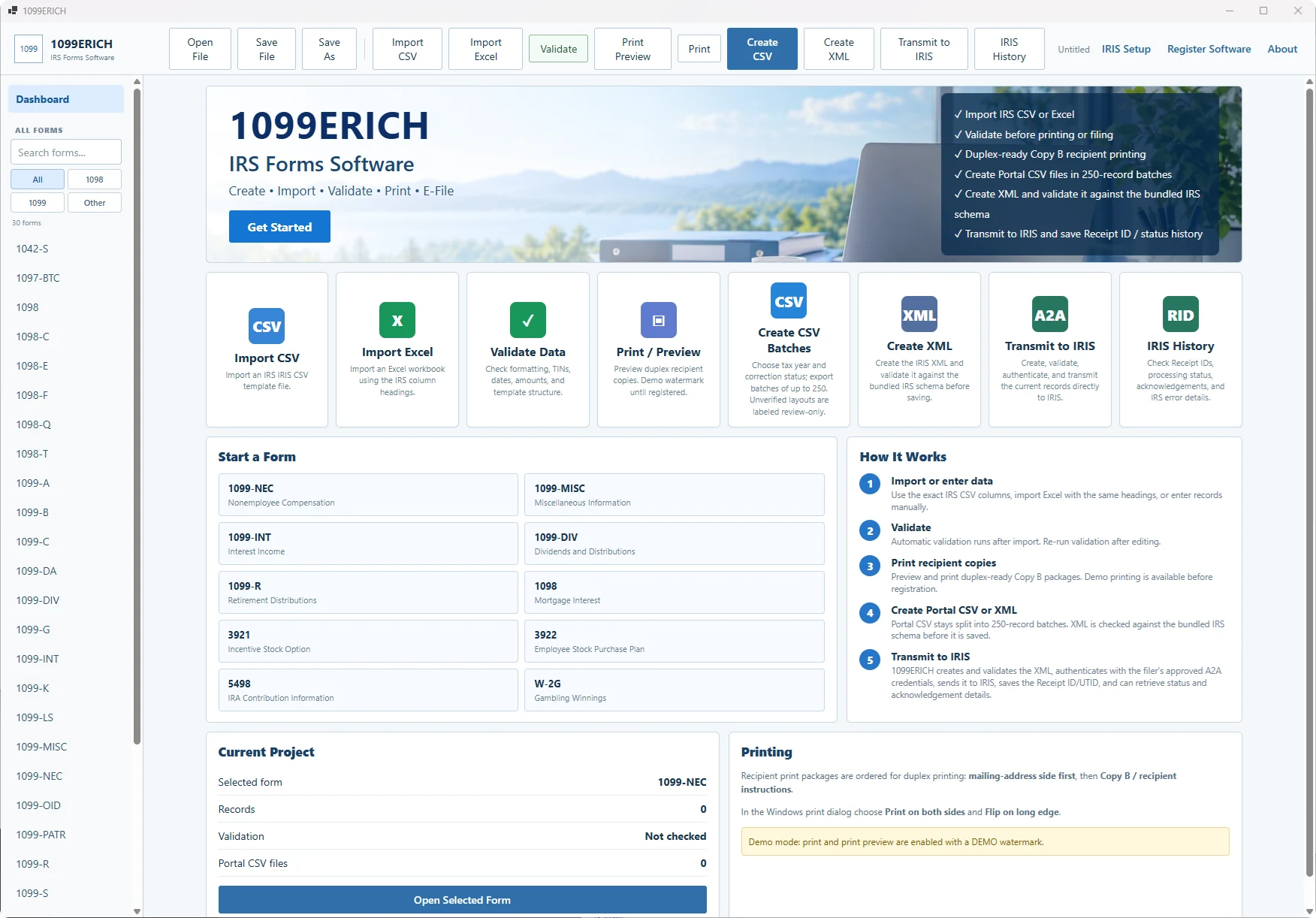
1099ERICH Windows dashboard used for 1095-C filing preparation
1099ERICH dashboard and supported-form workflow.
Dedicated Form 1095-C guidance

1095-C software: prepare aca employer coverage records without mixing form types

Whether you are working with a few records or a spreadsheet batch, this guide focuses on the actual reporting data behind IRS Form 1095-C. It complements the Windows software workflow and helps you identify issues to review before printing or preparing an upload.

Real-world filing scenario

How applicable large employers, payroll providers and ACA compliance teams use Form 1095-C

An applicable large employer imports employee coverage offers and monthly code selections and must keep offer, affordability and covered-person data aligned.

Who needs this: Applicable large employers, payroll providers and aca compliance teams preparing returns in a repeatable Windows workflow.

Form distinction: 1095-C is employer ACA reporting through IRS AIR rather than an IRIS information-return CSV.

Fields to prepare

Form 1095-C import data checklist

Before uploading a 1095-C Excel spreadsheet, check these form-specific source columns against the IRS instructions and supported import template:

  • Employee name and TIN
  • Monthly offer-of-coverage codes
  • Employee required contribution
  • Safe harbor codes
  • Covered individuals if self-insured
Pre-filing review

Common 1095-C data mistakes to check

  1. Review monthly code combinations.
  2. Reconcile employee eligibility with payroll and benefits feeds.
  3. Prepare the related 1094-C transmission.

Why it matters: CSV column structure, names, tax identification numbers, codes and amounts must match the current IRS or agency rules. A locally prepared file still requires agency acceptance.

One Windows package, multiple forms

Prepare Form 1095-C in 1099ERICH

Import supported data, review the 1095-C records, and prepare the applicable output. This reporting category uses the ACA filing workflow; verify the current release and exact form capability before buying.

View ACA Software Options

Official filing-system and form instructions: IRS electronic filing information. The software does not decide whether a payment is reportable. Verify the form instructions and filing-year specifications before filing.

Windows desktop workflow

Prepare 1095-C records without retyping every filing.

Use a repeatable local workflow for importing, reviewing, correcting, and preparing employee-facing output before the separate IRS AIR filing step.

Import CSV or Excel

Bring structured 1095-C data into the software from a spreadsheet or system export.

Review & validate

Check required values and formatting issues that 1099ERICH can identify locally before you move to the separate electronic filing step.

Prepare recipient copies

Use the same reviewed records to prepare the applicable employee, responsible-individual, or recipient statements.

Keep data on your PC

The normal preparation workflow runs locally on Windows rather than requiring you to upload the source spreadsheet to a 1099ERICH web account.

Different filing system

1095-C electronic filing goes through IRS AIR—not IRIS.

Forms 1094-C and 1095-C are electronically filed through the IRS ACA Information Returns (AIR) system. They are not filed through the IRIS Taxpayer Portal. AIR electronic filing follows IRS ACA schemas, business rules, enrollment, testing, and transmitter requirements that are separate from the 1099ERICH desktop preparation workflow.

What 1099ERICH does: imports structured 1095-C data, supports local review and validation checks, and prepares employee-facing output in the Windows desktop workflow.

What 1099ERICH does not claim on this page: This page does not represent that the current release creates AIR XML, connects directly to AIR, or transmits Forms 1094-C/1095-C to the IRS. If AIR XML or transmission support is added to a future release, it should be identified separately for the applicable tax year.

Data preparation

Build a cleaner 1095-C source file before filing.

1095-C filers commonly include applicable large employers and other organizations with Form 1095-C reporting responsibilities.

Prepare the right fields: Typical records may include employee identifying information, offer-of-coverage codes, employee required contribution amounts, safe-harbor and other applicable codes, covered-individual data when required, and other ACA fields. The exact required fields and codes can change by tax year, so use the current official instructions for the return you are preparing.
Form 1095-C FAQs

Frequently asked questions about Form 1095-C software and filing

Answers specific to aca employer coverage records, software preparation, and the correct filing workflow.

Who commonly needs Form 1095-C software?

Common filers include applicable large employers, payroll providers and ACA compliance teams. For example: An applicable large employer imports employee coverage offers and monthly code selections and must keep offer, affordability and covered-person data aligned.

What data do I need for an IRS Form 1095-C import?

Prepare employee name and TIN; monthly offer-of-coverage codes; employee required contribution; safe harbor codes; covered individuals if self-insured. Match the data to the supported 1095-C CSV or Excel layout and check the current agency instructions.

What should I check before preparing Form 1095-C?

Review monthly code combinations; reconcile employee eligibility with payroll and benefits feeds; prepare the related 1094-C transmission.. Correct the source records and review the output before filing.

Does 1095-C software eliminate the need for 1094-C?

No. Employer ACA filing ordinarily also involves the applicable Form 1094-C transmittal and current AIR requirements.

Where do I electronically file Form 1095-C?

Electronic filing follows the requirements of IRS ACA Information Returns (AIR). Confirm current AIR file specifications. Preparing the file in Windows is separate from submitting it to the agency.

Is Form 1095-C sold separately?

No. 1099ERICH lists Form 1095-C within the 1099ERICH Windows software. Review the download page for release availability and actual supported functionality before purchase.

One Windows package

Explore Form 1095-C software options.

ACA software uses its own reporting workflow. Contact us about pricing and release availability for Form 1095-C.

CSV + Excel importLocal validationRecipient outputIRS AIR filing destination
ACA software compatibility

Confirm tax-year AIR output before filing.

ACA is a separate Windows product for Forms 1095-B and 1095-C. The preparation workflow imports Excel files, reviews coverage records, and supports recipient-form printing. The ACA program is not an IRS IRIS CSV product.

Electronic ACA submission uses the IRS AIR system. AIR XML manifest and data files are tax-year and release dependent. Before relying on a particular installation for tax year 2026 submission, confirm that its output supports the current AIR schemas, the applicable Form 1094 transmittal, and the filing method you intend to use. Purchasing software alone does not submit returns to the IRS.

Software and filing service are separate WooCommerce products. The filing service requires secure intake and confirmation of scope.

AIR RequirementsAsk About ACA Software