Windows desktop software by ERICH Incorporated
608-444-6575 · info@1099erich.com
20+ YearsInformation-return filing experience
Windows DesktopLocal preparation workflow
Your Data Stays LocalWorking files remain on your PC
E-file PreparationIRIS, AIR & SSA workflows
Modern tax workspace with 1099-NEC paperwork, clipboard, receipts, calculator, and business supplies
1099-NEC software

1099-NEC Software for Windows — Contractor Filing

Download 1099-NEC software for Windows to prepare contractor returns. Import Excel or CSV, review nonemployee compensation, print supported recipient copies and generate IRS IRIS CSV upload files on your computer.

TWO WAYS TO FILE

Choose Your Filing Option

Prepare and upload your own 1099-NEC returns with our Windows software, or let ERICH transmit your IRS filings for you. Software licenses and managed e-filing are separate options.

STARTER

Up to 1,000 records

$149

For businesses that want to prepare and file their own 1099 returns.

  • All supported IRS IRIS forms
  • Excel and CSV data import
  • Review and validate records
  • Prepare printable recipient copies
  • Create IRIS-ready CSV files
  • Keep working data on your PC
Buy Starter — $149
MANAGED E-FILING

We E-File for You

$300

Flat fee for 1–1,000 eligible original 1099-NEC returns. No software to purchase.

  • No TCC or ID.me setup on your end
  • Secure data review and approval
  • We transmit through IRS IRIS
  • Originals; corrections quoted separately
  • Printable, masked-recipient-TIN PDFs
  • You handle printing and delivery
See E-Filing Pricing — $300

Software: One record is one recipient form included in an IRIS CSV filing file. The IRS portal CSV batch limit is separate from your software license allowance. See counting examples. Managed filing: ERICH transmits for you; printed and mailed recipient copies are not included.

FORM 1099-NEC

Built for nonemployee compensation paid to contractors

For small businesses, bookkeepers and accounts-payable departments. Make sure payments handled by third-party networks are classified correctly and do not duplicate amounts reported on 1099-K.

Check these 1099-NEC fields

  • Contractor name and TIN from Form W-9
  • Nonemployee compensation and withholding
  • Contractor totals reconciled to accounts payable

Example: Contractor payment review

A construction firm pays independent subcontractors from accounts payable. Before importing its annual list, it matches each contractor’s tax name and TIN to the W-9 and excludes payments reportable by certain third-party settlement organizations.

Form-specific check: Form 1099-NEC is for qualifying nonemployee compensation—not rent, wages or every credit-card transaction. Review withholding and state fields separately, then compare totals with payment history.

Before importing: Reconcile contractors’ payments to W-9 records and accounts payable; investigate any apparent duplication with Form 1099-K.

The IRS portal is free

Prepare your filing data with the software, then submit an eligible CSV through the free IRS IRIS Taxpayer Portal using your own IRIS account. The IRS does not charge a portal filing fee.

IRS IRIS filing information ↗

We can file for you

Prefer not to upload the filing yourself? ERICH can transmit your eligible original Form 1099-NEC returns for $300 per filing job, covering up to 1,000 returns for one payer and tax year. Published volume tiers are available up to 20,000 returns; corrections and special cases are quoted separately.

See Managed E-Filing Volume Prices

Download Windows Software ↓ Installation help Compare with Form 1099-MISC →

MADE FOR CONTRACTOR REPORTING

Prepare Form 1099-NEC without retyping every contractor

Form 1099-NEC reports nonemployee compensation, commonly payments to independent contractors. Instead of manually entering each recipient into the IRS portal, use the 1099ERICH Windows application to import your spreadsheet, review payer and recipient information, and prepare supported IRIS CSV upload batches.

  • Import contractor records from supported Excel or CSV files.
  • Review names, TIN fields and payment amounts before generating filing output.
  • Create filing files for the IRS IRIS Taxpayer Portal and recipient PDFs where supported.

The screenshot below shows the actual Form 1099-NEC data-entry interface. Final tax-year requirements and supported features may vary by release.

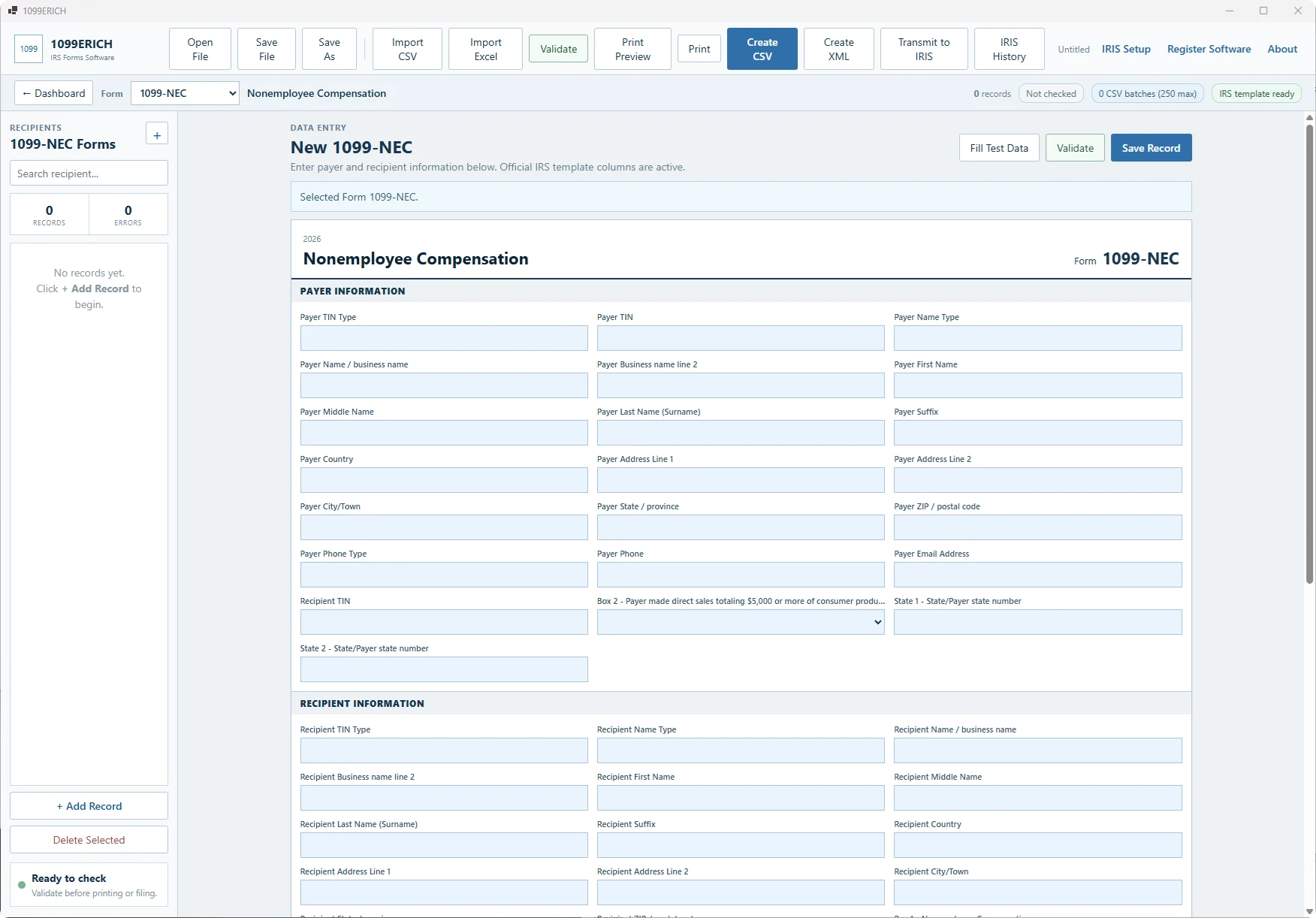
Actual Form 1099-NEC data entry and review screen in 1099ERICH Windows software
Form 1099-NEC software interface — illustrative screen capture of an actual program view
1099-NEC WINDOWS SOFTWARE

A practical 1099-NEC filing workflow for businesses and accountants

If your accounting system already contains contractor payments, you should not have to type every Form 1099-NEC manually. Start with a structured Excel or CSV export, review your contractors, and prepare the IRS upload files and recipient statements from the same data.

01

Import contractor data

Use a supported Excel or CSV layout containing payer and recipient details, taxpayer identification numbers and nonemployee compensation amounts. See the sample import files before importing your own data.

02

Review before filing

Check contractor names, addresses, TIN fields, compensation amounts and applicable withholding. Reconcile with your accounting source and correct issues before preparing final files.

03

Prepare recipient copies

Generate and inspect the available recipient-copy output before distribution. Make sure you use the appropriate tax-year form layout and taxpayer identification number masking rules.

04

Make IRS IRIS upload files

Create supported 1099-NEC IRIS CSV files and upload them to the free IRS portal using your own authorized account. Alternatively, choose the separate managed e-filing service.

2026 TAX YEAR — FILED IN 2027

Important changes to Form 1099-NEC

The IRS increased the general 1099-NEC contractor-payment reporting threshold from $600 to $2,000 for payments made in 2026, subject to exceptions including certain backup-withheld payments. The IRS also revised the form to address cash tips, tipped occupation codes and overtime compensation. Confirm that the software release you install supports the tax year and fields you need before buying or producing final returns.

Read the official IRS 1099-NEC instructions →
BEFORE YOU BUY

1099-NEC software questions

Does the software file 1099-NEC returns directly with the IRS?

No. The Windows software prepares supported IRIS CSV files. You submit them through your own authorized IRS IRIS Taxpayer Portal account. ERICH also offers a separately priced We E-File for You service.

Can I import 1099-NEC records from Excel?

Yes, using the structured Excel or CSV layouts supported by this product. Check the sample files and column requirements rather than assuming any arbitrary accounting export will import without mapping.

Is there a separate charge for each 1099-NEC form?

No per-form license is required within the stated Starter or Business record allowance. Starter costs $149 for up to 1,000 records and Business costs $249 for up to 5,000 records; these are software preparation limits, not IRS upload limits.

Can I try the 1099-NEC software before purchasing?

Use the Windows software download to inspect the workflow with supported sample data, then choose the record allowance that fits your filing volume.

Does it support tax year 2026 and the new Form 1099-NEC fields?

The IRS changed the 2026 return format, including the compensation threshold and new data fields. Review the release's supported tax years and fields before buying; do not assume an older installer supports all 2026-specific requirements.

Can ERICH file for me without my own TCC?

Yes, for eligible filings handled under the separate managed service. You send data through the secure intake workflow, review and authorize the filing, and receive printable recipient PDFs when available. See the flat-fee tiers.

Software DownloadSee Plans