Windows desktop software by ERICH Incorporated · Your source data stays on your computer608-444-6575
1097-BTC, 1098, 1099, 3921, 3922, 5498 and W-2G software

1099 Software for IRS IRIS Filing

Import IRS CSV or Excel files on your Windows PC, validate information-return data, print recipient copies, and create upload files for the IRS IRIS Taxpayer Portal.

Windows Desktop SoftwareData Stays on Your PCERICH Incorporated608-444-6575
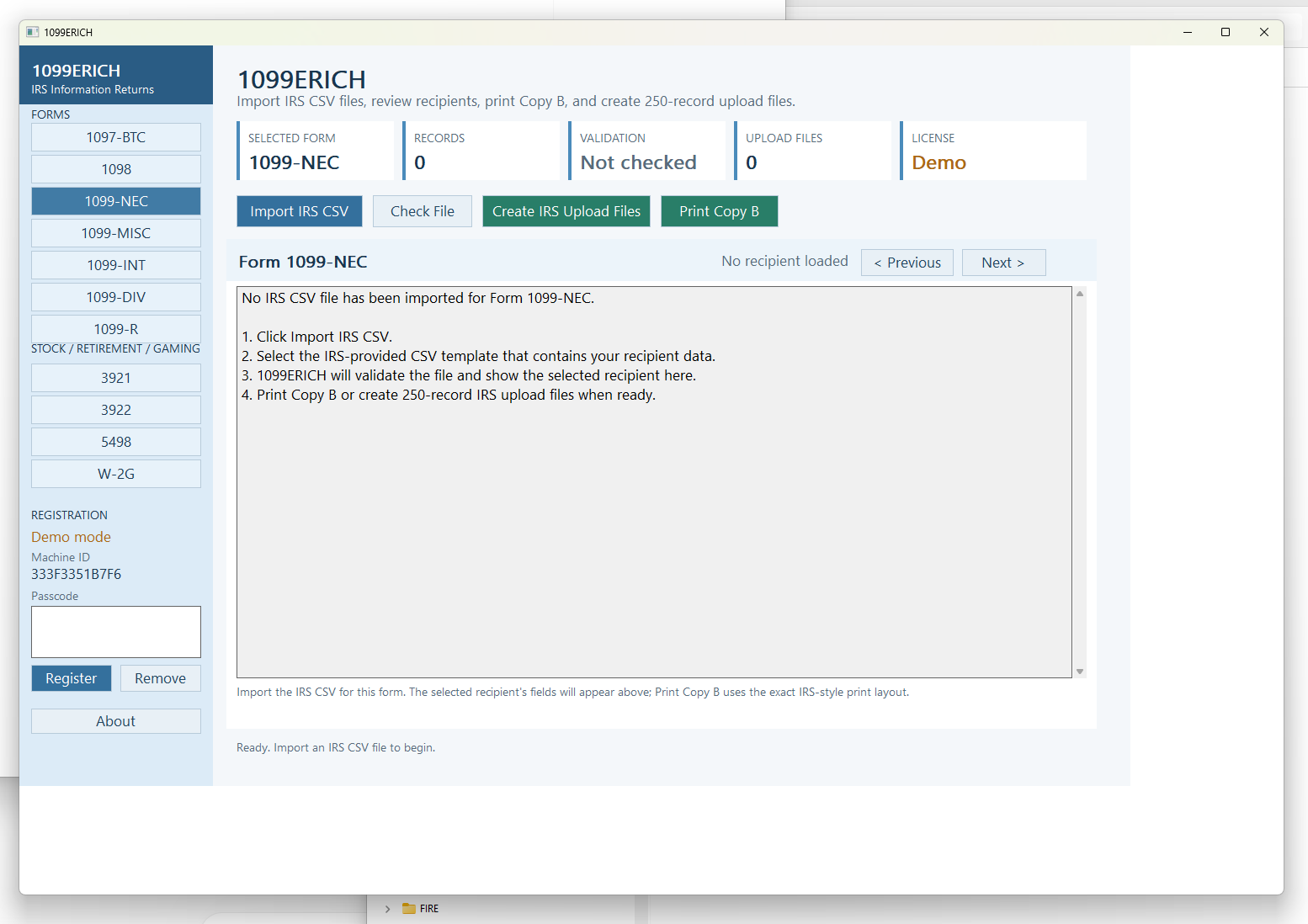
1099ERICH Windows software showing the 1099-NEC dashboard, IRS CSV import, validation, recipient copy printing and IRS upload file controls
Actual 1099ERICH Windows software interface.
Popular filing software

Choose the form you need to prepare.

Start with one of the most commonly searched information-return forms, or browse the complete 1099ERICH software directory.

A safer local workflow

One software program. Six clear steps.

Prepare the source file once, re-import until it is clean, produce recipient copies, and create the upload files automatically.

1

Complete a sample file

Start with a CSV or Excel layout and enter payer and recipient data.

2

Import and validate

Find missing fields and formatting errors before printing or filing.

3

Print Copy B

Create paper or PDF output with masked SSNs and recipient instructions.

4

Create 250-record files

1,000 recipients become four validated CSV upload files.

5

Upload to IRIS

Use your own ID.me account and IRIS TCC to upload directly.

6

Or book e-file help

No IRIS access? Schedule a separate assisted filing appointment for $399.

See the Detailed Workflow
Correct the source, not the portal

Import, review, correct and repeat until there are no errors.

Validate the import, fix flagged fields in your CSV or Excel source file, and re-import until the data is clean.

  • Keep one controlled source file
  • Find problems before you print recipient copies
  • Re-import as many times as needed
  • Create IRIS files only after validation is clean
ImportCSV or Excel
ValidateReview the report
CorrectEdit the source
Clear the imported data and repeat until the report shows no errors.
Privacy by design

Your source file stays on your computer.

1099ERICH processes source files locally on your PC. Keep Social Security numbers out of ordinary email and upload final files directly to the IRS.

Read the Data Privacy Approach
CSV or Excel sourceStored and edited on your computer
Local validation and printingNo routine upload to ERICH Incorporated
Direct IRS uploadFinal CSV files go from your computer to IRIS
Recipient delivery

Print the address on one side and Copy B with instructions on the other.

Print directly to paper or create a duplex-ready PDF. Recipient SSNs are masked on the printed copy. Take the PDF to a print shop or use your own duplex printer.

  • Masked recipient SSNs
  • Mailing address side
  • Copy B and instructions on reverse
  • PDF output for print-shop production
View Printing Recommendations
1099ERICH File Export1,000 recipients
CSV
Validated recipient data
1,000 records
Upload File 1Records 1–250
Upload File 2Records 251–500
Upload File 3Records 501–750
Upload File 4Records 751–1,000
Automatic file splitting

Tell the software once. It creates every 250-record file.

The software determines how many CSV files are needed, names the files in sequence and validates the exported records before you upload them.

4 CSV upload files
Important: The IRS currently allows up to 250 records in one CSV upload file, while its portal may handle final submission in smaller groups. Always follow the current on-screen IRIS instructions.
Popular information returns

Support for 1098, 1099, 3921 and 3922 forms.

Use the forms page to review the supported form families and confirm the tax year you need before purchasing.

1098 SeriesMortgage and education returns
1099 SeriesPopular information returns
Form 3921Incentive stock option exercise
Form 3922Employee stock purchase transfer
Review Supported Forms
No ID.me account or IRIS TCC?

Book an assisted IRIS e-file appointment for $399.

Prepare and validate every CSV file before the Google Meet. ERICH Incorporated signs in using its authorized transmitter access, remains present while you select and upload the files from your computer, signs out after the session, and forwards the IRS results when available.

Credentials are never shared. Your files remain on your computer until you upload them to the IRS portal during the appointment.
Separate service
$399

Scheduled assisted filing appointment

  • Google Meet setup
  • Authorized ERICH transmitter sign-in
  • Guided upload of prepared CSV files
  • IRS results forwarded when available
Book an Appointment
Form-specific software pages

Find the exact information return you need.

Dedicated pages explain the workflow for high-volume searches such as 1099-MISC software, 1099-NEC software, 1099-INT software, 1099-R software, 1098-T software and more.

Browse All 35 Form Pages

Prepare recipient copies and IRIS files without emailing SSNs.

Buy the Windows desktop software for $299 or download the sample layouts first.

E-file HelpBuy $299